
Overview
Every property in Futurestay has a setup checklist that tracks your progress toward launch. You’ll find it by clicking the progress indicator on your property card or inside the property settings. It’s organized into three tabs: Required, Recommended, and Direct Booking.
The checklist shows your completion percentage and highlights the next step you should take. Items turn green with a checkmark as you complete them. Once all required items are done, you’ll see a “Ready when you are” banner with the option to launch.
Required Tab
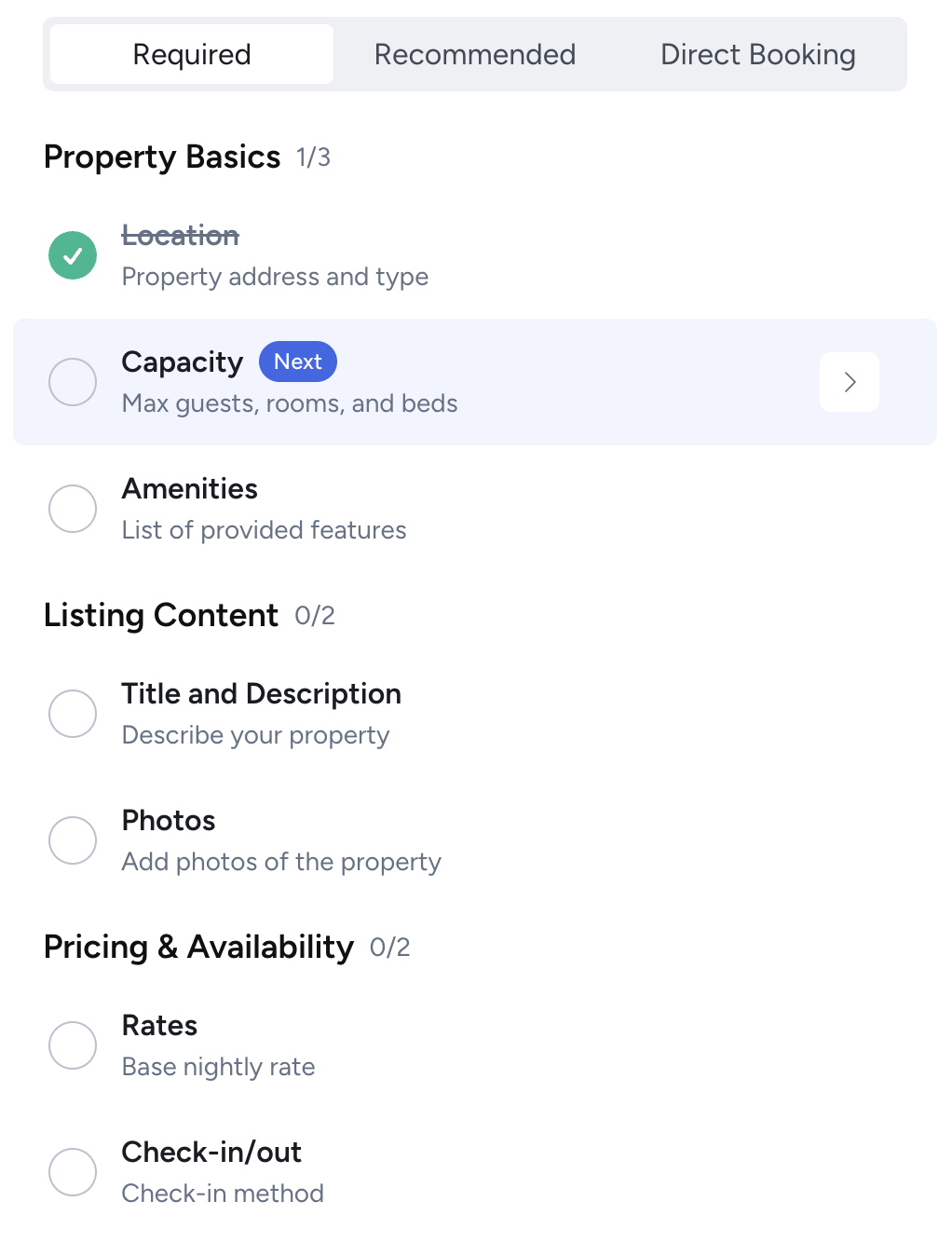
These are the essentials. You can’t launch your property until every item in this tab is complete.
Property Basics
- Location: Your property address and type. This determines your tax jurisdiction and powers map-based search on channels like Google Vacation Rentals.
- Capacity: Max guests, number of rooms, and beds. Guests filter by these on every channel, so accuracy matters.
- Amenities: The features your property offers. Amenities affect search filters, guest expectations, and your competitive positioning. See Managing Amenities for more on how tiers and comp insights work.
Listing Content
- Title and Description: Your property title and description. These are the first things guests read. The title syncs to channels, so write it for both your direct booking site and Airbnb.
- Photos: Property images in the order you want them displayed. Lead with your strongest exterior or hero shot. Most channels require at least 5 photos.
Pricing and Availability
- Rates: Your base nightly rate. You can add weekend rates, seasonal rates, and more later, but the base rate is required to launch. See Setting Your Rates.
- Check-in/out: Your check-in method (self check-in, lockbox, smart lock, in-person) and check-in/check-out times. See Setting Check-in/out Times.
Recommended Tab
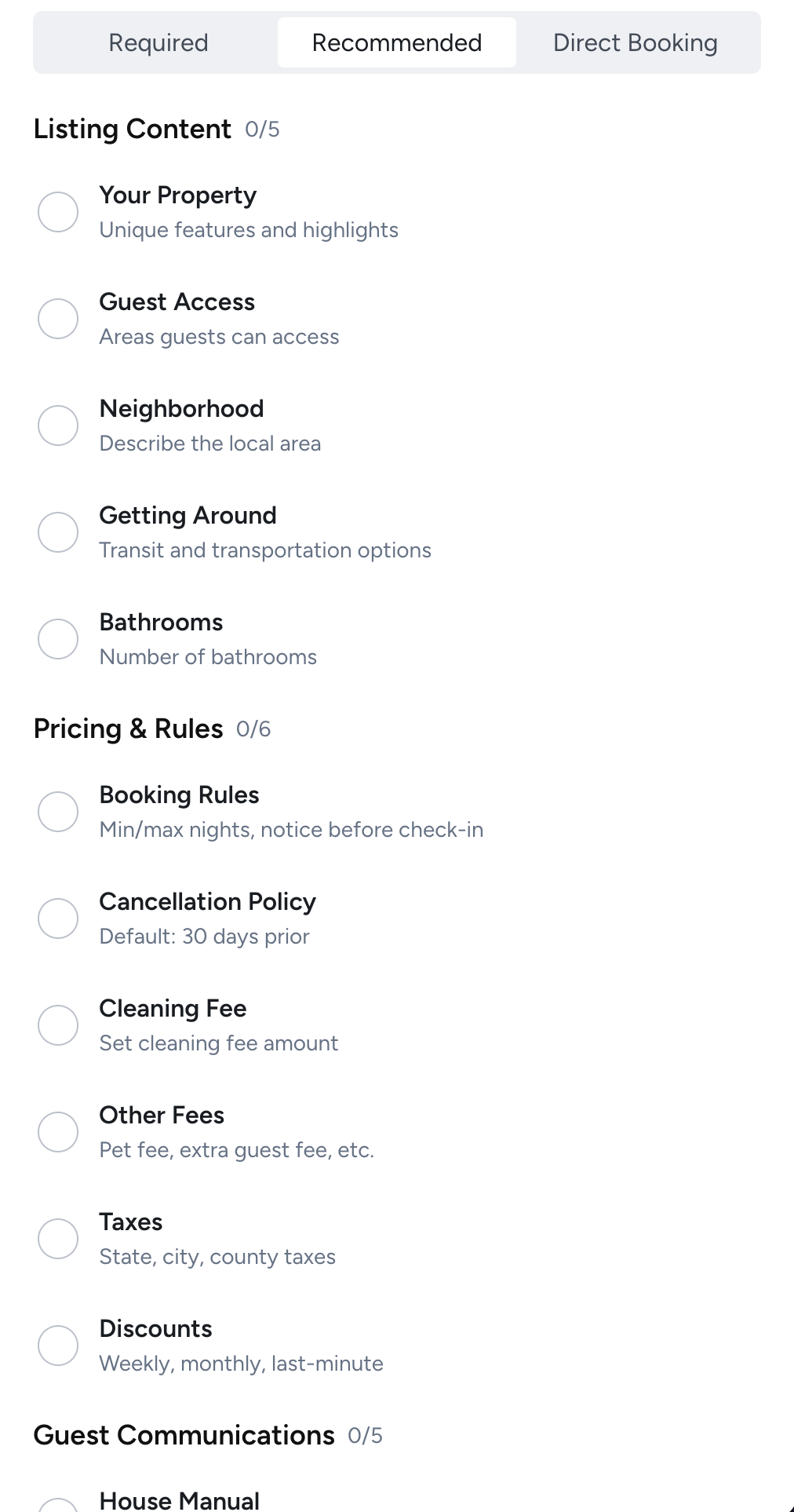
These items aren’t required to launch, but completing them significantly improves your listing quality, guest experience, and booking conversion. Skip at your own risk.
Listing Content
- Your Property: A description of what makes your space unique, highlights, and special features.
- Guest Access: Which areas of the property guests can access (entire home, private room, shared spaces).
- Neighborhood: A description of the local area, nearby attractions, restaurants, and activities.
- Getting Around: Transit options, parking details, and transportation info.
- Bathrooms: Detailed bathroom count and configuration.
Pricing and Rules
- Booking Rules: Minimum and maximum night stays, advance notice period, and turnover days. See Booking Rules.
- Cancellation Policy: Your cancellation terms. Defaults to 30-day advanced refundable, but you should review it. See Setting Your Cancellation Policy.
- Cleaning Fee: A per-stay cleaning fee. Most hosts charge one. See Managing Fees.
- Other Fees: Pet fees, extra guest fees, and other charges.
- Taxes: State, city, and county tax rates that apply to your property.
- Discounts: Weekly, monthly, and last-minute discounts to incentivize longer or spontaneous stays.
Guest Communications
- House Manual: Instructions for using appliances, house quirks, and general property info that guests need during their stay.
- Directions: How to find the property, parking instructions, and any tricky navigation details.
- Wifi Details: Network name and password. One of the most frequently asked guest questions.
- Check-in/out Instructions: Step-by-step arrival and departure instructions. These go out in automated guest emails.
- Interaction with Guests: How available you’ll be during the stay (available, minimal contact, etc.).
Policies and Safety
- House Rules: Children, pets, smoking, parties, quiet hours, and property-specific rules. See Configuring House Rules.
- Safety Considerations: Pools, bodies of water, heights, animals, or anything guests should be aware of.
- Safety Devices: Cameras, noise monitors, smoke alarms, CO detectors. Disclosure is required on most channels.
- Property Info: Stairs, noise levels, parking limitations, and shared spaces.
Direct Booking Tab
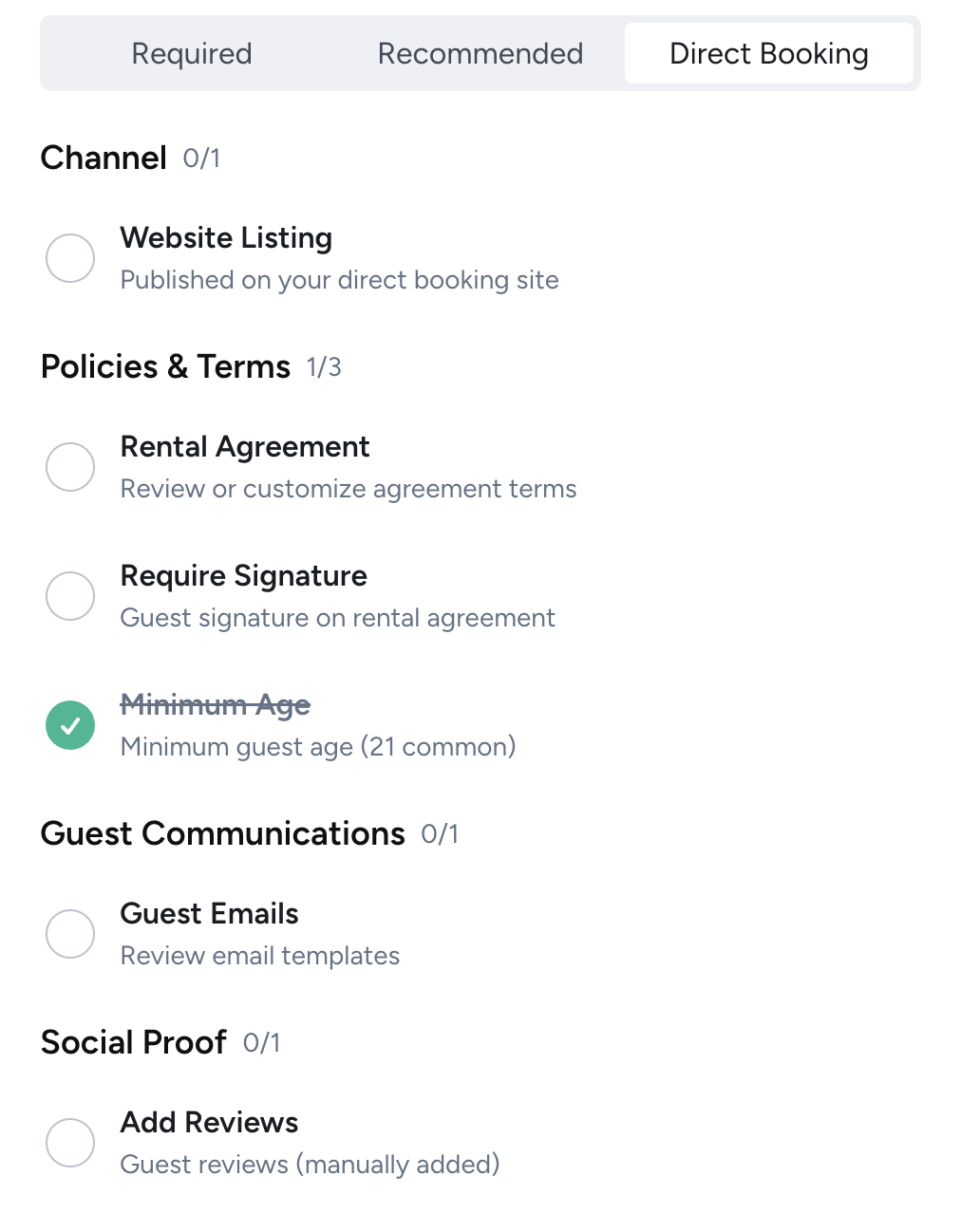
These items are specifically for your Futurestay direct booking website. They don’t affect your channel listings.
Channel
- Website Listing: Publish this property on your Futurestay direct booking site. Until you do this, the property only appears on connected channels like Airbnb.
Policies and Terms
- Rental Agreement: Custom terms that apply to direct bookings. See Writing a Rental Agreement.
- Require Signature: Whether guests must electronically sign your rental agreement before check-in.
- Minimum Age: Set a minimum age for the primary guest (21 is common).
- Permits and Licenses: Your STR permit or license numbers, if required by your jurisdiction.
Social Proof
- Guest Emails: Review and customize your automated email templates (booking confirmation, check-in instructions, post-stay review request).
- Add Reviews: Manually add guest reviews from other platforms to display on your direct booking site. This builds trust with guests who haven’t seen your Airbnb reviews.
Tips
You don’t have to do everything at once. The checklist is designed to be completed over time. Focus on the Required tab first to get your property launched, then work through Recommended and Direct Booking items as you have time.
Some items can be skipped. If an item doesn’t apply to your property (for example, you don’t have a pool so Safety Considerations is irrelevant), you can click “Skip” to mark it as reviewed without filling it in.
The progress bar counts all tabs. Your completion percentage reflects all three tabs combined, not just the one you’re viewing.